
As an executive or office assistant, you often arrange meetings for others. With hybrid work, half the people sit in the meeting room and the other half join online. These three Teams tips save you a lot of hassle before, during and after the meeting. They apply to the new Teams and the new Outlook.
1. Automatically add a Teams link to every invitation
Nothing is more annoying than an invitation without a link, and having to resend everything. So let Outlook turn every meeting into a Teams meeting automatically.
- In Outlook, open Settings > Calendar > Events and invitations.
- Turn on the option to add online meetings to all meetings.
The exact name can differ between classic and new Outlook. Also read make every meeting a Teams meeting.

Scheduling for your manager? With delegate access to their calendar, you create the meeting directly on their behalf.
2. Take notes in one shared place
Notes in a loose Word file get lost quickly. Instead, use:
- Meeting notes in Teams: open the meeting in your calendar and choose Notes. Everyone sees and edits the same agenda and action items, also after the meeting.
- A OneNote tab in the team's channel, for recurring meetings. Click + in the channel, choose OneNote and name the notebook.
More OneNote tips in getting started with OneNote.
3. Record the meeting and turn on the transcript
Taking minutes during a busy discussion is hard. So start a recording and transcript, with the participants' consent.
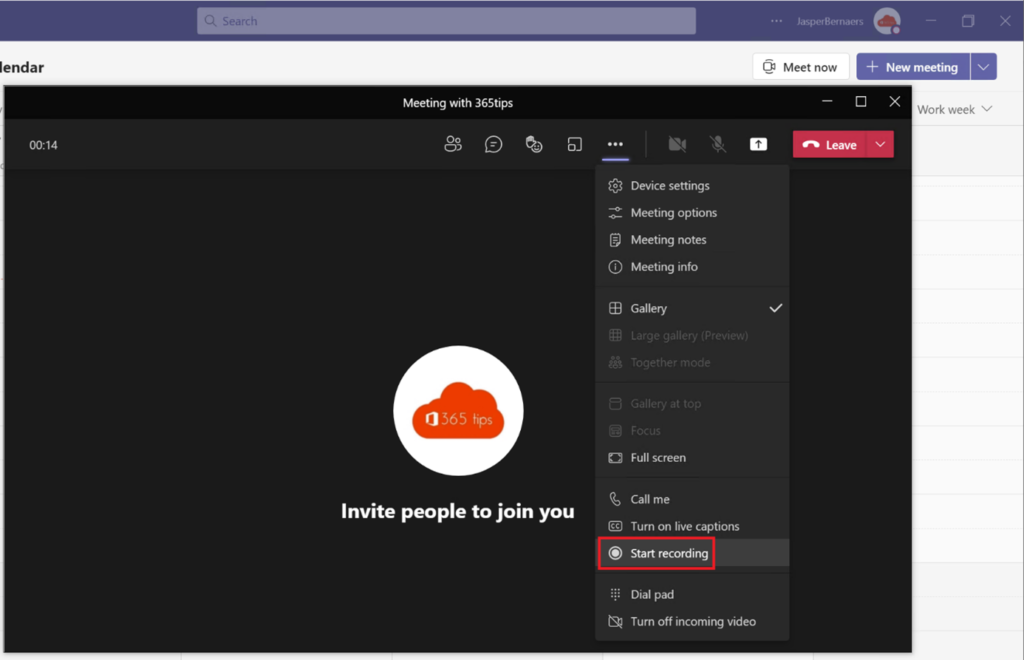
- During the meeting, click More (...) > Record and transcribe.
- Choose Start recording.
- After the meeting you'll find the recording and transcript in the meeting chat and on the Recordings tab.
If your organization has Microsoft 365 Copilot or Teams Premium, you also get an automatic recap with action items. Always check it before sending it around.
Also read automatically record a meeting.
Bonus: hybrid meetings
- Ask attendees to indicate whether they'll join online or in person.
- Book a meeting room with a Teams Rooms device, so people online can hear and see everything well.
Also see schedule a Teams meeting.
Read also
Give every Outlook meeting a Teams link automatically
Schedule a Microsoft Teams meeting in your calendar
How to record and transcribe a Teams meeting automatically from the start
Nederlandstalige versie: 3 tips voor efficiënte Teams-vergaderingen als secretaresse