Teaching in Microsoft Teams today feels a lot like a real classroom: you see many students at once, split the class into groups and stay in control of the meeting. This article covers the key meeting features of Teams for education and how to use them.
See up to 49 students at once
In a meeting, select View at the top. In Gallery you see up to 49 videos at once, depending on your device, your screen and how many cameras are on. Want everyone in one virtual space? Choose Together mode.
- Pin: pin a student for yourself via the three dots next to their name.
- Spotlight: put a speaker in the spotlight for the whole class.
Breakout rooms for group work
With Breakout rooms you split the class into small groups. You decide whether Teams assigns students automatically or manually, you set a timer and you bring everyone back to the main meeting with one click. Only the organizer (or an assigned room manager) can manage the rooms.
Stay in control of the meeting
- Raise hand: students ask to speak without talking over each other.
- Meeting options: decide who can present, who bypasses the lobby and whether students can use their mic or camera.
- Lock the meeting: nobody else can join once class has started.
- Turn off chat during or after class.
- Attendance report: see afterwards who attended and for how long.
- Custom background: choose or upload a background via Video effects. Your school can restrict this.
Classroom insights
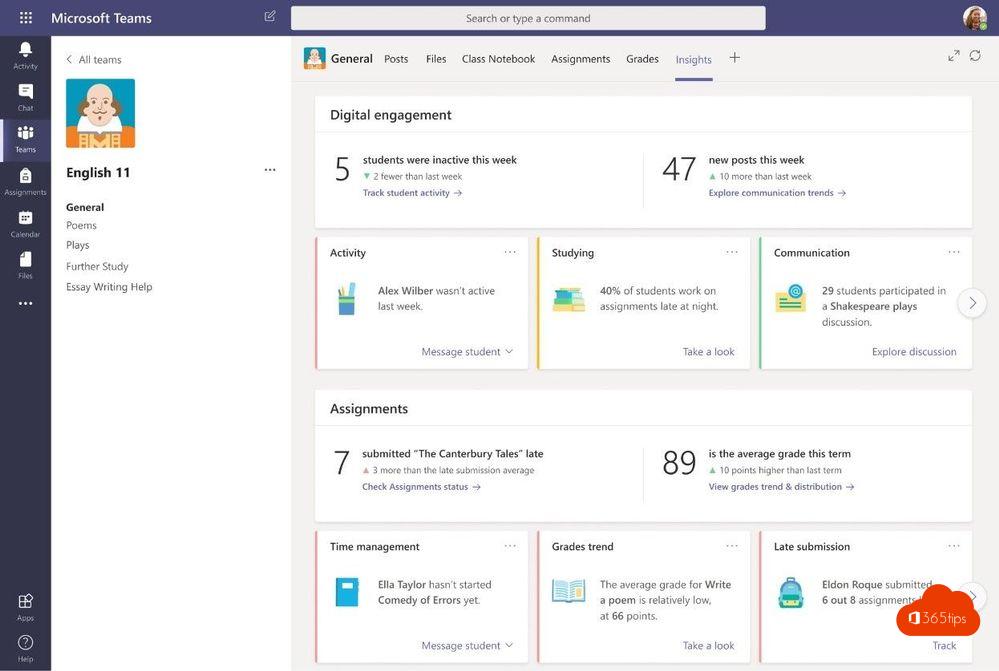
Teachers can use the Insights app (formerly Class Insights). It shows student activity, assignments and attendance in a class team, among other things. The available data depends on your school's settings.
Learn more
Microsoft offers free quick start guides and training for teachers and students via Microsoft Learn and the Microsoft Education center. In Teams you'll also find Help > Training.
Also see breakout rooms in Microsoft Teams and Together mode.
Read also
Everything about breakout rooms in Microsoft Teams
Together mode in Microsoft Teams: one shared virtual space
Microsoft 365 for education: set up your school and class
Nederlandstalige versie: Microsoft Teams voor het onderwijs: grote galerie, breakout rooms en meer