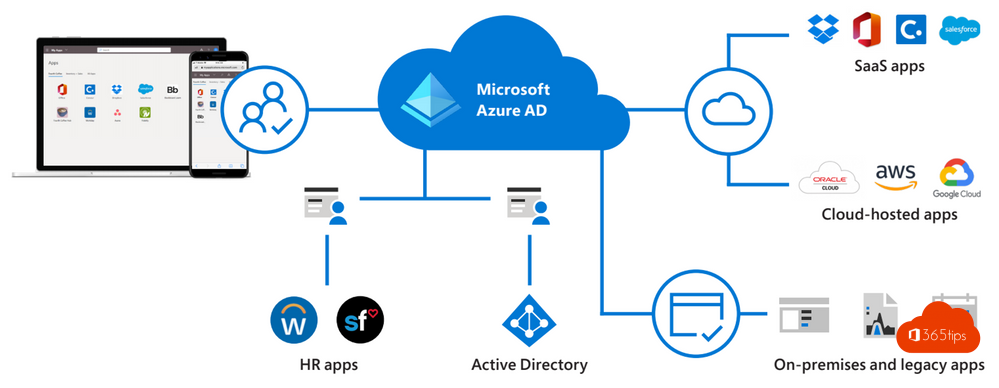
Microsoft 365 Business Premium is more than Office with email. It also includes Microsoft Entra ID P1, bringing a range of security and management features you don't get in Business Standard. This article explains what P1 gives you and which features to use first.
What's in Entra ID P1?
| Feature | What it does |
|---|---|
| Conditional Access | Allow or block access based on user, location, device and app; require MFA |
| Dynamic groups | Groups that fill themselves based on department or job title |
| Group-based licensing | Assign licences automatically through a group |
| SSPR with writeback | Reset your own password, including for users from on-premises AD |
| Application Proxy | Publish internal web apps securely without a VPN |
| Sign-in logs and reports | Longer retention and more detail |
What to turn on first
- MFA with Conditional Access for everyone. Read enable MFA.
- Block legacy authentication protocols.
- Give only managed devices access to sensitive data, with Intune. See also block downloads on unmanaged devices.
- SSPR. Read Self-Service Password Reset.
What else is in Business Premium?
- Microsoft Intune for device management.
- Microsoft Defender for Business to protect PCs and servers.
- Defender for Office 365 Plan 1 against phishing and malicious attachments.
- Purview information protection with sensitivity labels and DLP.
And P2?
Entra ID P2 (for example in Microsoft 365 E5) adds Identity Protection with risk-based policies and Privileged Identity Management. Read risky sign-ins and check your licence.
Read also
Which Microsoft 365 licence do I have? How to check
Enable multi-factor authentication (MFA) in Microsoft 365
Security defaults in Microsoft Entra ID: what they do and how to enable them
Nederlandstalige versie: Microsoft Entra ID P1 in Microsoft 365 Business Premium: wat krijg je?
More in English
▸Block downloading Microsoft 365 files on unmanaged devicesGive unmanaged devices only limited web access to SharePoint, OneDrive and Teams, with no downloading,…
▸The basic settings to start using Microsoft IntuneGet Microsoft Intune ready: licences, automatic enrolment, enrolment restrictions, compliance policies and…
▸Detect risky sign-ins and users with Microsoft Entra ID ProtectionReview risky sign-ins, risky users and risk detections in Entra ID Protection, and respond automatically with…
▸Enable Self-Service Password Reset (SSPR) in Microsoft Entra IDLet users reset their own password with SSPR in Microsoft Entra ID. Licensing, authentication methods and…