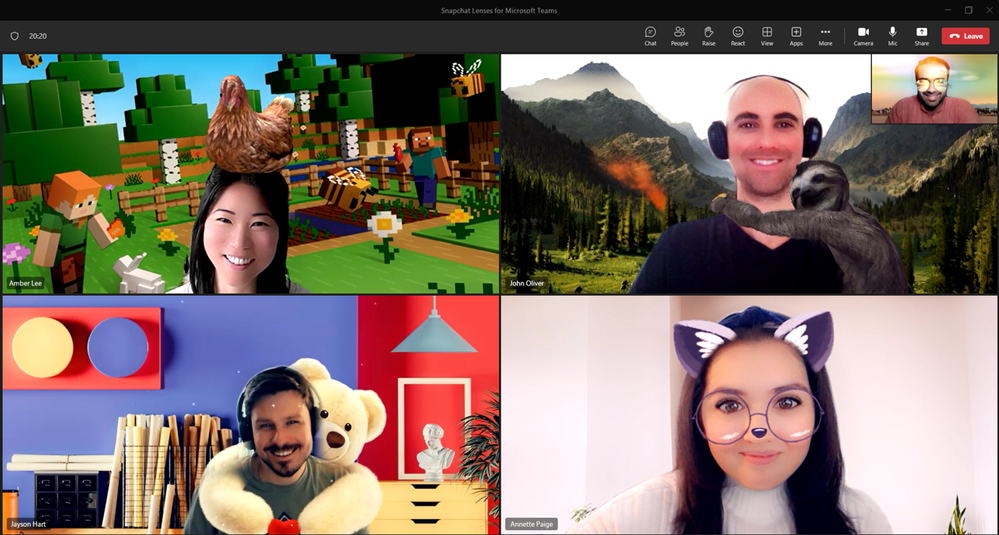
In April 2023, Microsoft announced Snapchat Lenses in Teams: fun AR effects that turn you into a cartoon character or make snow fall in your office, directly from Video effects. Before that, you needed the separate Snap Camera app. What's the situation today, and what should you use now? Snap Camera was discontinued on January 25, 2023 and no longer works. Whether Snapchat Lenses still appear in your Teams depends on your version and your organization's settings; don't count on it. Use the built-in Teams video effects.
What were the Snapchat Lenses in Teams?
Through Snap's Camera Kit, a rotating set of roughly twenty to thirty lenses came to Teams. You found them in Video effects on a separate Snapchat tab, without extra downloads. It was a playful addition, mainly for informal meetings.
What to use now
Teams has plenty of built-in effects. Open Video effects and settings on the pre-join screen, or during a meeting via the arrow next to Camera:
- Backgrounds: blur your background or pick your own image.
- Filters: color filters and frames (depending on your version).
- Brightness and soft focus for better video.
- Avatars: join as an avatar without a camera.
- Reactions: send a heart, applause or laugh that floats over your video.
External "virtual camera" apps can still work, but your organization may block them. On a work computer, only install software your IT department allows. Also see video filters and effects in Teams and live reactions in Teams meetings.
Read also
Use video filters and effects in Microsoft Teams
Turn on brightness correction and soft focus in Microsoft Teams
Use live reactions in a Microsoft Teams meeting
Nederlandstalige versie: Snapchat-lenzen en Snap Camera in Microsoft Teams: wat nu?