Buying a Copilot license is one thing; making sure your colleagues actually use Copilot is another. That's why Microsoft offers free adoption material with ready-made emails, images and tips. Here's how to use that onboarding toolkit to introduce Copilot in your organization step by step. The toolkit is still on adoption.microsoft.com, but Microsoft now often bundles the material in a broader Copilot Success Kit, so names and contents may differ from what you see below.
What's in the toolkit?
The toolkit is built around a campaign of several weeks. Each week users get a short email with a few tips and sample prompts for one app. The original version looked like this:
| Week | Topic |
|---|---|
| 1 | Introduction: what Copilot can do for you |
| 2 | Copilot in Teams |
| 3 | Copilot in Outlook |
| 4 | Copilot in PowerPoint |
| 5 | Copilot in Word |
| 6 | Copilot in Excel |
| 7 | Copilot Chat |

Download the toolkit
- Go to adoption.microsoft.com and open the Copilot page.
- Look for the user onboarding toolkit or the Copilot Success Kit.
- Download the package. You get a zip file with a folder per week, containing email templates and images.
- Extract the zip file and browse each folder to see its tips and templates.

Customize the emails
- Translate the templates if needed. Copilot itself can help.
- Add your own branding, logo and contact person.
- Replace the sample prompts with examples from your own work, such as a typical customer email or a weekly team meeting.
- Link to your own internal guidelines on AI and confidential data.
- Schedule the emails, for example every Monday, or publish the content as a SharePoint news post.
Sample prompts from the toolkit
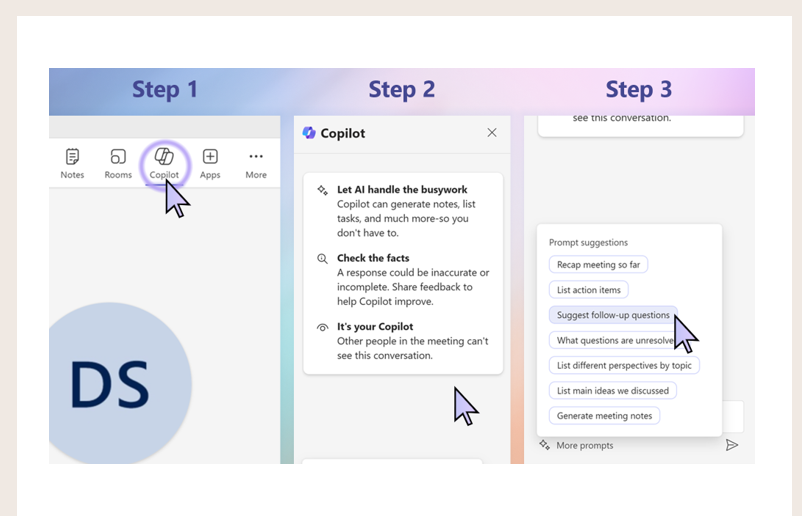
Users open Copilot with the Copilot icon in the app and pick a suggested prompt or type their own.
In Teams, during or after a meeting:
- Summarize what I missed in this meeting.
- Are there any action items for me?
- Create a table of the options discussed with their pros and cons.
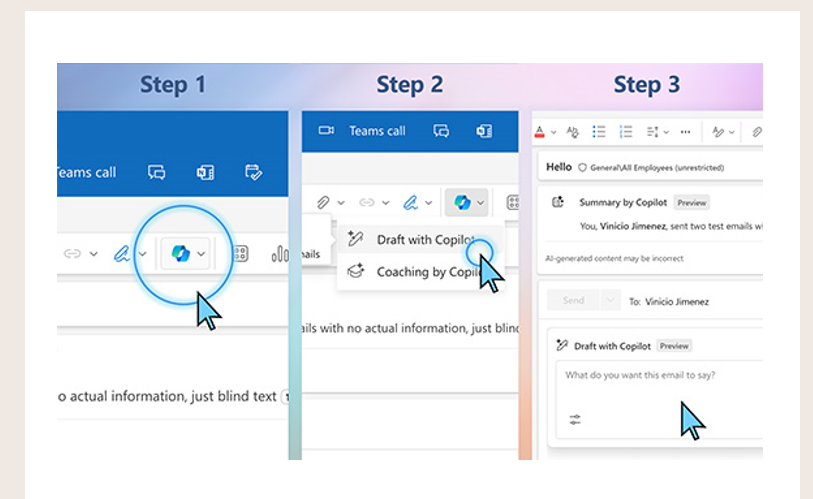
In Outlook:
- Summarize this email conversation.
- Draft a reply to [name] and make it sound like me.
- Write an email congratulating my team on [result].
Tips for a successful rollout
- Start with a small group of Copilot champions who help their colleagues.
- Measure usage with the Copilot dashboard in Viva Insights or the usage reports in the Microsoft 365 admin center.
- Ask for feedback regularly and share the best prompts in a Teams channel.
Also see meeting notes with Copilot in Teams and the Microsoft 365 Copilot license.
Read also
The Microsoft 365 Copilot license: what you get and how to buy it
Create meeting minutes in Teams with Microsoft 365 Copilot
What is Microsoft 365 Copilot and which versions exist?
Nederlandstalige versie: Copilot introduceren met de onboardingtoolkit van Microsoft