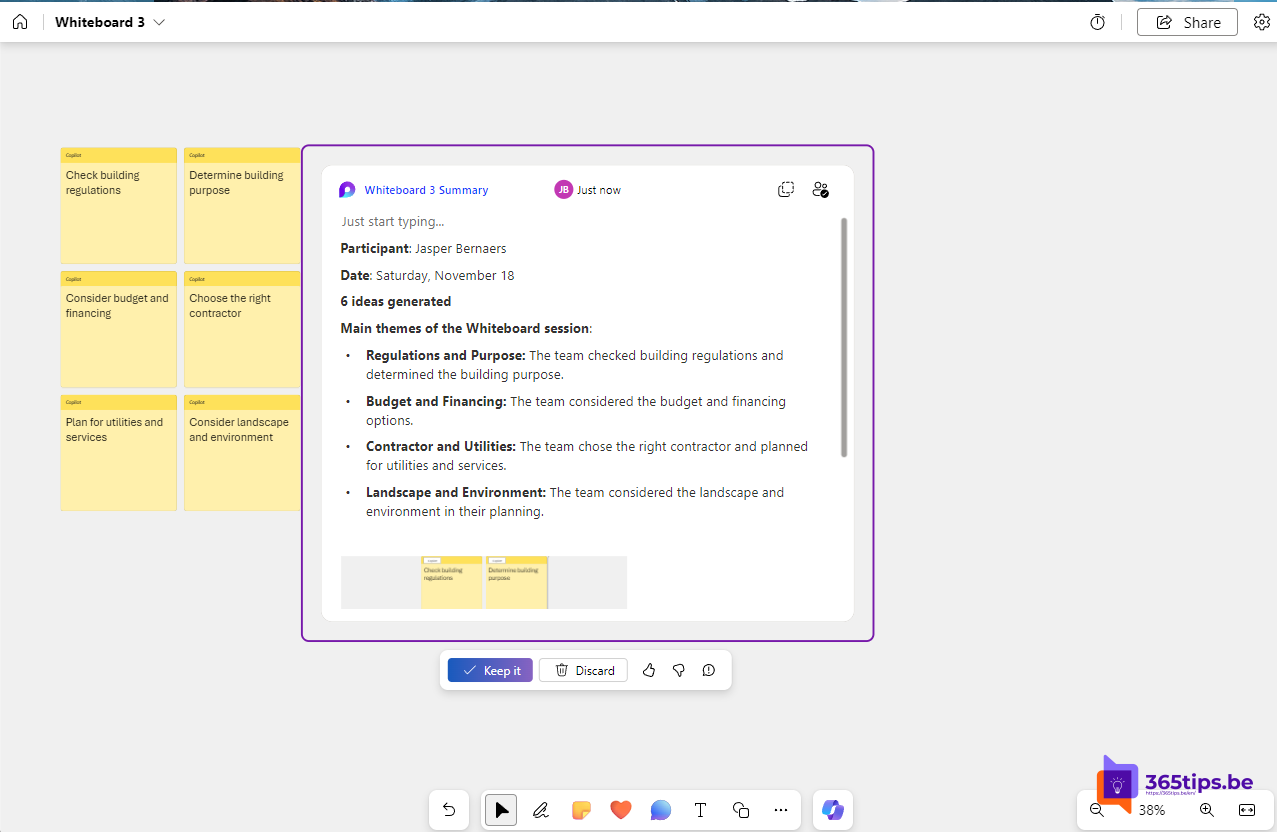
With Copilot in Microsoft Whiteboard you let AI help during a brainstorm. Copilot suggests ideas, groups sticky notes by theme and summarizes a whole board. Here's how it works and what you need.
Copilot is built directly into Whiteboard for work and school accounts with a Microsoft 365 Copilot license. Availability and the exact buttons may differ.
What does Copilot in Whiteboard do?
- Suggest ideas: describe your topic and Copilot creates a set of sticky notes with suggestions.
- Categorize: Copilot groups loose notes into themes.
- Summarize: Copilot creates a summary of the board's content, handy to share after a workshop.
What you need
- A work or school account with a Microsoft 365 Copilot license.
- Whiteboard on the web (via the Microsoft 365 app launcher), in Teams or in the Windows app. Not every version has Copilot.
How to use it
- Open or create a whiteboard.
- Click the Copilot icon in the toolbar at the bottom.
- Choose Suggest ideas and type a prompt, for example: Generate 3-5 bullet points to prepare for building a house with a garden.
- Review the suggestions. Remove what you don't want, ask for more with Generate more or edit, then click Insert.
- Later, select a group of notes and choose Categorize or Summarize.


Tips
- Use Copilot as a starting point, not the end result. Let the team add to the ideas and vote.
- Check the suggestions: AI can make mistakes.
- No Copilot license? With Microsoft 365 Copilot Chat you can also create a list of ideas and paste it onto the board yourself.
Also see Microsoft Whiteboard tips and Whiteboard in a Teams channel.
Read also
Microsoft Whiteboard: tips to sketch and brainstorm together
Use Microsoft Whiteboard in Teams channels and meetings
What is Microsoft 365 Copilot and which versions exist?
Nederlandstalige versie: Brainstormen met Copilot in Microsoft Whiteboard
More in English
▸The Copilot Prompt Gallery (formerly Copilot Lab): 10 useful promptsCopilot Lab is now the Copilot Prompt Gallery. See where to find prompts in Microsoft 365 Copilot Chat and…
▸The Microsoft 365 Copilot license: what you get and how to buy itWhat the Microsoft 365 Copilot license includes, how it differs from free Copilot Chat, and how to buy and…
▸Create meeting minutes in Teams with Microsoft 365 CopilotLet Copilot in Teams summarize meetings, list open questions and write minutes with action items. With…
▸Get started with Microsoft 365 Copilot Chat (formerly Bing Chat Enterprise)Bing Chat Enterprise is now Microsoft 365 Copilot Chat. How to use the secure AI chat with your work account…