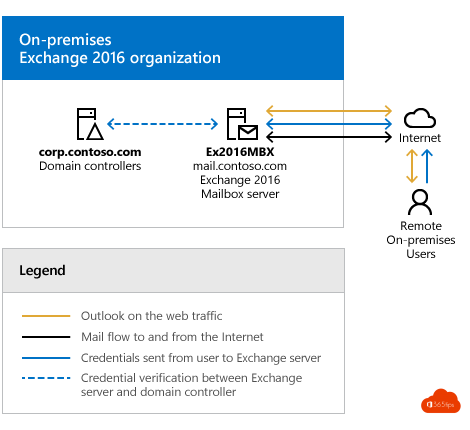
With a hybrid Exchange configuration, your on-premises Exchange environment and Exchange Online work together as one email organization. Users barely notice the migration, and you keep managing your users from Active Directory. But a hybrid isn't always needed. This article explains when it makes sense and when it doesn't. Note that Exchange 2016 and 2019 reached end of support in October 2025: for a hybrid server you now use Exchange Server Subscription Edition (SE).
What is an Exchange hybrid?
In a hybrid environment some mailboxes are on-premises and others are in Exchange Online. For users it's one organization: they share calendars, see each other's free/busy and find each other in the same address book. You manage recipients in your on-premises environment and the mailboxes themselves in the cloud.
You set up a hybrid with the Hybrid Configuration Wizard (HCW). Read how to install a hybrid Exchange server.
The benefits
- Secure mail flow between your on-premises environment and Exchange Online, with TLS-encrypted connectors.
- Move mailboxes with the familiar Exchange tools, in batches and at your own pace.
- Little user impact: after the move, Outlook usually only needs to sign in again. Profiles don't have to be recreated.
- Shared calendars and free/busy keep working between on-premises and cloud mailboxes.
- Applications and printers that send through your on-premises Exchange keep doing so during the migration.
- Correct management of email addresses and properties as long as you sync users with Microsoft Entra Connect.
When not to choose a hybrid
- You're a small organization and want to migrate quickly in one go. A cutover migration or a migration tool may be enough.
- You're not coming from Exchange, but from another mail server.
- You have no Exchange knowledge in-house and no partner to help.
- You no longer want servers that you need to patch and expose to the internet.
Without a hybrid: what about applications and printers?
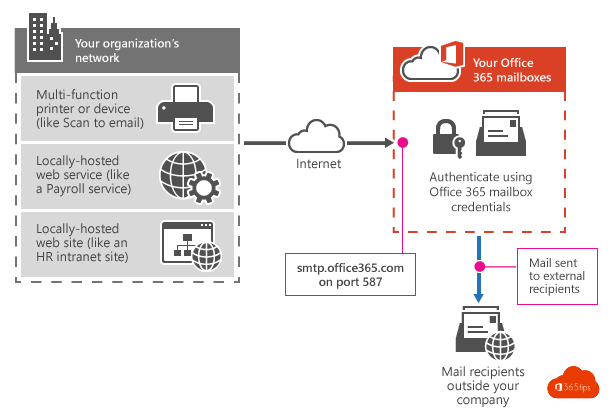
Removing your on-premises Exchange? Then scanners, printers and applications must send mail directly through Microsoft 365.
| Option | How | Watch out |
|---|---|---|
| SMTP AUTH (client submission) | The device signs in with a mailbox and sends via smtp.office365.com, port 587, with STARTTLS. | Microsoft is phasing out basic authentication for this. Use OAuth if your device supports it. |
| Direct send | The device sends directly to your MX record on port 25. | Only for recipients in your own organization. Microsoft recommends restricting this. |
| SMTP relay via a connector | You create an inbound connector in Exchange Online for your network's IP address. | Requires a static public IP address. |
Decommissioning your hybrid after the migration
Still syncing users from Active Directory? Then you need a way to manage email addresses and Exchange properties. You have two choices:
- Exchange management tools: Microsoft lets you remove the last Exchange server and manage recipients with the management tools and PowerShell. For many organizations that's the best choice.
- Keep one Exchange SE server for management and possibly application relay.
Don't just remove Exchange without a replacement. You'd have to set email addresses on AD objects by hand, which takes a lot of time and leads to errors. Or make all users cloud-managed, see turn off directory sync and go cloud-only.
Also see the Exchange migration action plan and the benefits of migrating to Exchange Online.
Read also
Install and configure Exchange Server as a hybrid server
Exchange migration to Microsoft 365: an action plan
The benefits of an Exchange migration to Microsoft 365
Nederlandstalige versie: Waarom en wanneer kies je voor een Exchange hybrid?