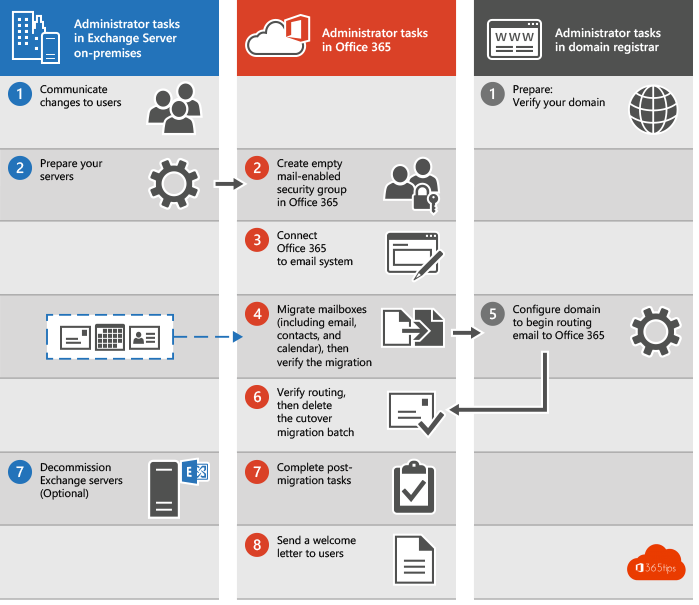
An Exchange migration to Microsoft 365 often feels like a big project. But with good preparation it's mainly a matter of measuring, planning and communicating. This article gives you a high-level action plan for a migration from Exchange on-premises to Exchange Online. Still running Exchange 2016 or 2019? Those reached end of support in October 2025, so migrating to Exchange Online or to Exchange Server SE is urgent.
1. Choose the right migration method
| Method | Suited for |
|---|---|
| Cutover migration | Small organizations that move all mailboxes at once. Microsoft recommends this for a limited number of mailboxes. |
| Hybrid migration | Medium and large organizations, or anyone who keeps syncing users from Active Directory. This is the most common method. |
| Third-party migration tool | Complex situations, such as mergers or migrations between different systems. |
2. Pre-sync in advance
With a hybrid migration you copy the mailboxes to the cloud well in advance, without users noticing. You start the migration batches with the option to complete them manually. Exchange then syncs the mailbox to about 95% and keeps it up to date until you decide to switch.
- Preparation taking a long time? Exchange keeps tracking changes, so the final step stays short.
- At the moment you choose, you complete the batch. Users at most have to sign in to Outlook again.
3. Make everything measurable
- Map the number of mailboxes, their size and the archives.
- Test the throughput with a first batch and use it to calculate the duration.
- Add a margin of about 25% for unforeseen circumstances.
- Write down dependencies: shared mailboxes, permissions between mailboxes, applications and printers that send mail.
4. Communicate the why
Tell everyone that a migration is coming, when, and what they need to do. Above all, explain why: what's the vision, and what can users do afterwards? Think of bigger mailboxes, Outlook on every device, integration with Teams and better security. Also read the benefits of migrating to Exchange Online.
5. The step-by-step plan
- Inventory of mailboxes, groups, connectors, applications and DNS.
- Prepare identities: align UPNs with email addresses and sync with Microsoft Entra Connect.
- Set up the hybrid with the Hybrid Configuration Wizard.
- Pilot with IT and a few key users.
- Pre-sync all mailboxes.
- Switch over per batch or all at once.
- Update DNS: MX, Autodiscover, SPF, and set up DKIM and DMARC.
- Decommission: remove the on-premises servers or keep only the management tools.
6. After the migration
A technical migration isn't an end point but a starting point. Once your mailboxes are in the cloud, you can continue with MFA, Conditional Access, Teams, OneDrive and Copilot. Plan those next steps during the migration already.
Also see install a hybrid Exchange server and enable DKIM in Microsoft 365.
Nederlandstalige versie: Exchange-migratie naar Microsoft 365: een actieplan