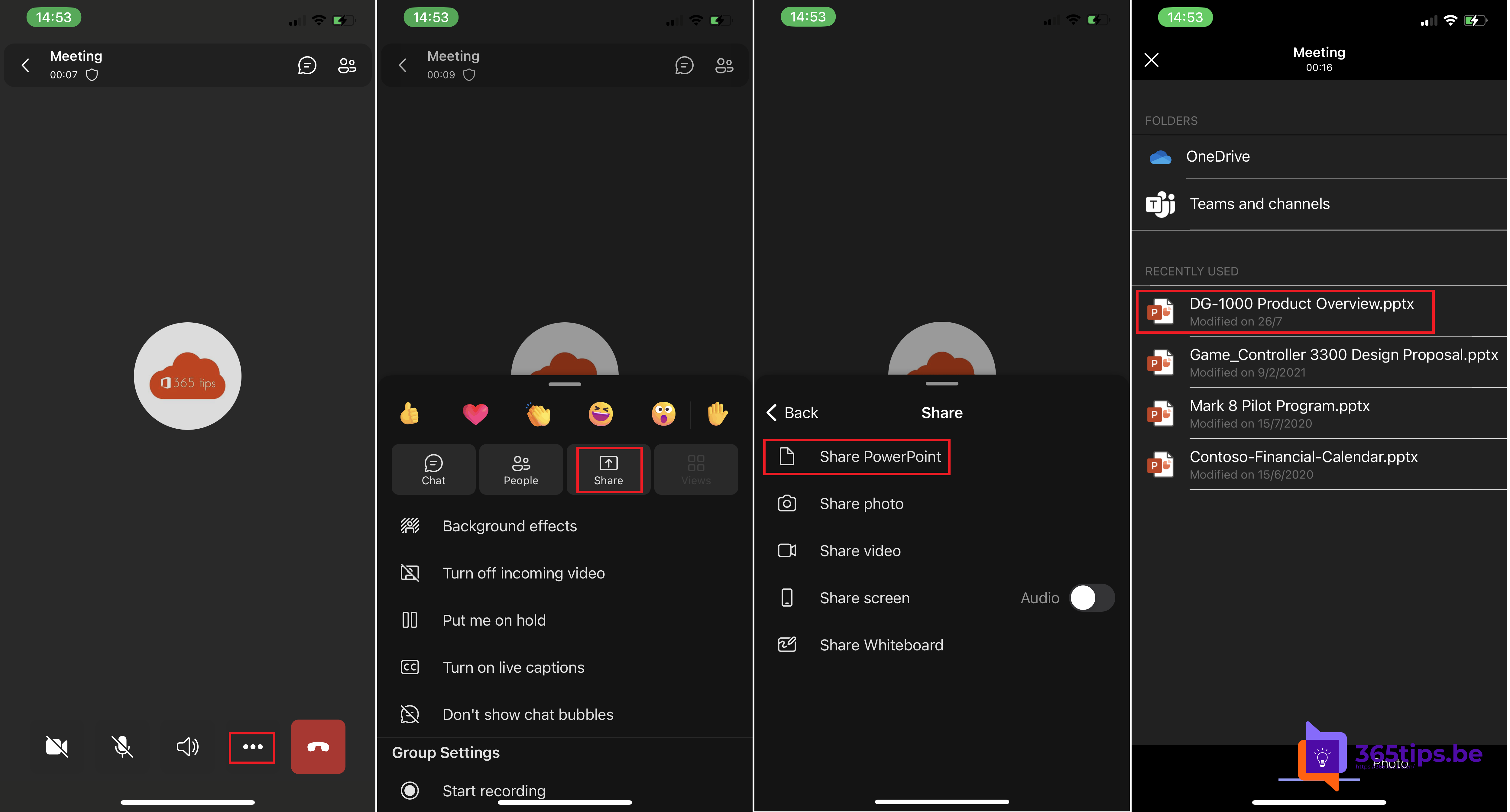
On the road but still need to present in a Teams meeting? With the Teams app on your iPhone, iPad or Android device you share a PowerPoint file and move through the slides yourself. No laptop needed.
Start a presentation from your phone
- Open the Teams app and join the meeting, or start one yourself.
- Tap More (the three dots) at the bottom.
- Tap Share and choose Share PowerPoint.
- Pick a presentation from your recent files, or browse OneDrive or a team.
- The presentation starts right away for all attendees.

During the presentation
- Use the arrows or swipe left and right to change slides.
- Turn your device sideways for a bigger view.
- Finished? Tap Stop presenting.
Tips
- Store the presentation in OneDrive or the team beforehand so you find it fast.
- Turn on Do not disturb so no pop-ups appear while you present.
- With PowerPoint Live, attendees see sharp slides even on a weak connection. They can sometimes browse back on their own, unless you turn that off.
Button names can differ slightly per device. Also see PowerPoint Live in Microsoft Teams and Teams on iPhone and iPad.
Read also
Present a PowerPoint in Teams with PowerPoint Live
Get started with Microsoft Teams on iPhone and iPad
Share your screen, a window or a whiteboard in Teams
Nederlandstalige versie: Een PowerPoint-presentatie geven vanuit de Teams-app op je gsm
More in English
▸Put your camera feed in your slides with Cameo in PowerPoint and TeamsAdd a Cameo frame in PowerPoint and present with PowerPoint Live in Teams, so your camera feed appears in…
▸Prevent attendees from browsing your presentation in TeamsTurn off Private viewing in PowerPoint Live, so attendees only see the slide you're…
▸Use presenter mode (Standout, Side-by-side, Reporter) in Microsoft TeamsStay visible with your slides using the Standout, Side-by-side and Reporter presenter modes in Teams. Plus…
▸Make a slow Teams mobile app faster on Android and iPhoneUpdate the app, clear the cache, limit data use and reinstall when the Teams mobile app is slow or…