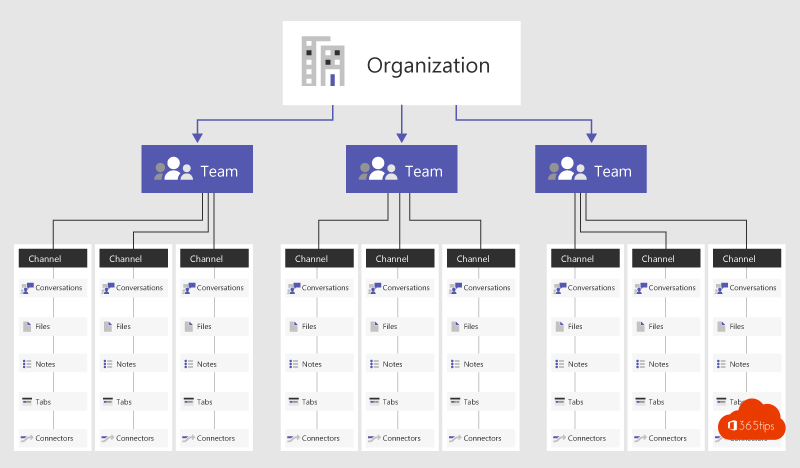
Microsoft Teams feels like a single app, but under the hood it works together with many familiar Microsoft 365 services. If you know where everything is stored, you manage Teams better and answer user questions faster. Here's how Teams is built, in plain language.
What is a team?
A team is a group of people with a shared place for conversations, files and apps. Technically, every team is a Microsoft 365 group in Microsoft Entra ID (formerly Azure Active Directory). That group determines who is a member or owner, and grants access to everything that belongs to the team.
- Owners manage the team, members collaborate, guests are external people with limited rights.
- A team can have tens of thousands of members. For organization-wide communication, Viva Engage or a communication site is often a better fit.
- Typically you create teams for fixed departments and for temporary projects.
Channels
A team is divided into channels, by topic or project. There are three kinds:
| Channel | Who sees it? | Files |
|---|---|---|
| Standard | All members of the team | A folder in the team's SharePoint site |
| Private | Only members of that channel | Its own separate SharePoint site |
| Shared | Channel members, also from other teams or organizations | Its own separate SharePoint site |
Which service does what?
| Part of Teams | Where it lives technically |
|---|---|
| Members, owners, sign-in | Microsoft Entra ID (Microsoft 365 group) |
| Files in a channel | SharePoint Online |
| Files in a chat | OneDrive of the person sharing the file |
| Chat and channel messages | The Teams chat service, with a copy in Exchange Online for compliance and eDiscovery |
| Calendar and meetings | Exchange Online (the user's or group's mailbox) |
| Meeting recordings | OneDrive (regular meeting) or SharePoint (channel meeting) |
| Notes | OneNote or Loop, replacing the former Wiki tab |
| Tasks | Microsoft Planner |
That's why a SharePoint problem sometimes also affects the Files tab in Teams, and why your Teams meetings show up in your Outlook calendar.
Microsoft Graph as the glue
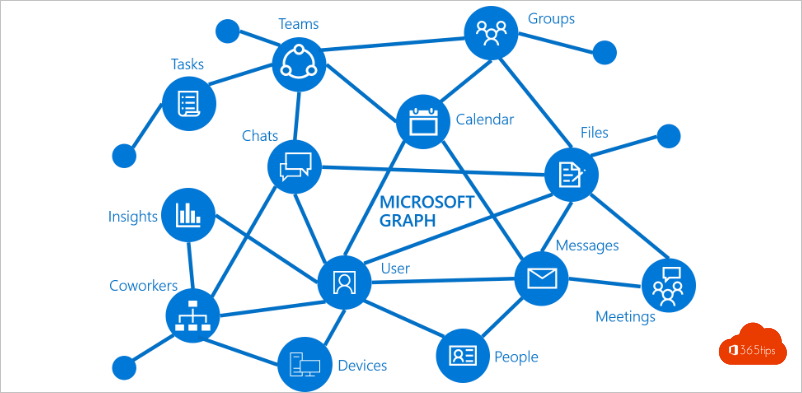
All these services talk to each other through Microsoft Graph. It's also the API that apps, scripts and Power Automate use to create teams, send messages or manage members.
Apps, tabs and bots
Channels really shine with apps: a tab with a Planner board, a Power BI report, a SharePoint page or a bot that answers questions. Admins decide in the Teams admin center which apps are allowed.
What does this mean for management?
- Rules for groups (naming, expiration, who can create teams) are partly set in Microsoft Entra.
- Sharing with external people depends on settings in Teams, Entra ID and SharePoint.
- Retention and eDiscovery are handled in Microsoft Purview.
Also see what owners, members and guests can do and Teams governance.
Read also
Owners, members and guests in Microsoft Teams: who can do what?
Create a standard, private or shared channel in Microsoft Teams
Technical governance for Microsoft Teams: best practices
Nederlandstalige versie: Hoe is Microsoft Teams technisch opgebouwd?