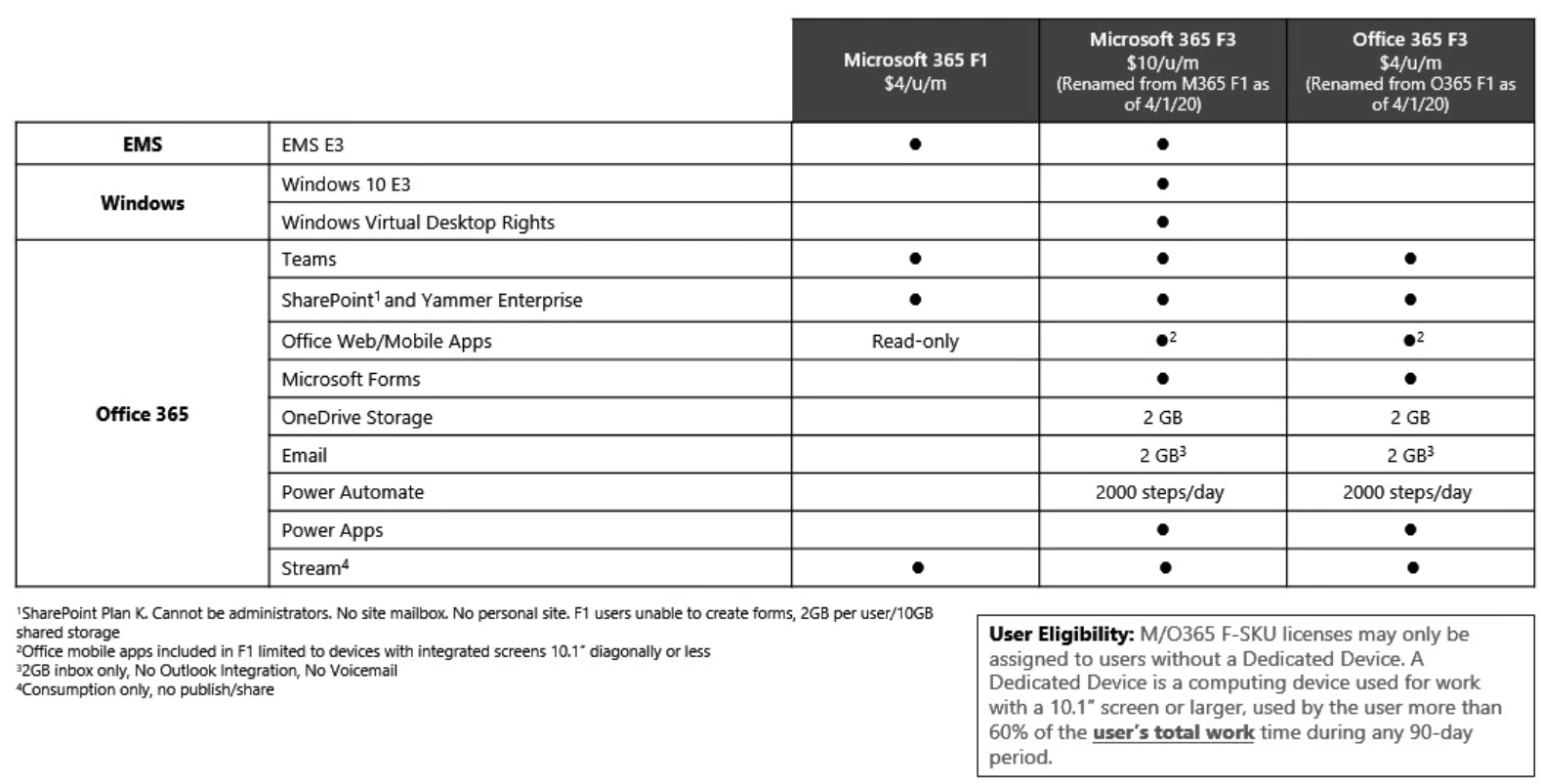
Staff in a shop, a care home, a factory or on the road often don't have their own desk. For them Microsoft has Frontline licenses: Microsoft 365 F1 and F3. They cost less than a regular license, but include less. Here's the difference.
Microsoft 365 F1
- Teams for chat, meetings and Shifts (schedules).
- Access to SharePoint and a limited OneDrive.
- No mailbox of their own and no Office apps for editing files.
- Entra ID P1 and Intune to manage devices and access.
Microsoft 365 F3
- Everything in F1.
- A small mailbox (Exchange Kiosk).
- Word, Excel and PowerPoint in the browser and on mobile.
- Windows Enterprise for shared devices, such as a till or kiosk.
Which one when?
| Situation | License |
|---|---|
| Only schedules, chat and announcements | F1 |
| Also email and viewing or lightly editing documents | F3 |
| Own PC, desktop apps and lots of storage | Business or E3 |
Tips
- Combine F licenses with shared devices and Intune, so staff can sign in and out quickly.
- Use tags and Shifts in Teams to reach shifts.
Exact contents can change over time and by country; check Microsoft's current product description. Also see Microsoft 365 licenses compared.
Read also
Microsoft 365 licenses compared: which one do you need?
Tags in Microsoft Teams: create, use and manage
Which Microsoft 365 licence do I have? How to check
Nederlandstalige versie: Microsoft 365 F1 en F3: licenties voor frontline-medewerkers
More in English
▸The basic settings to start using Microsoft IntuneGet Microsoft Intune ready: licences, automatic enrolment, enrolment restrictions, compliance policies and…
▸Microsoft 365 E3 or E5: what's the difference and which to choose?What's in Microsoft 365 E3 and E5, what E5 adds for security and compliance, and when E5 is worth…
▸Assign Microsoft 365 licenses automatically with groups in Entra IDLink licenses to a (dynamic) group in Microsoft Entra, so users automatically get the right…
▸Set up and use Walkie Talkie in Microsoft TeamsTurn your smartphone into a two-way radio with Walkie Talkie in Teams. How admins make the app available, how…