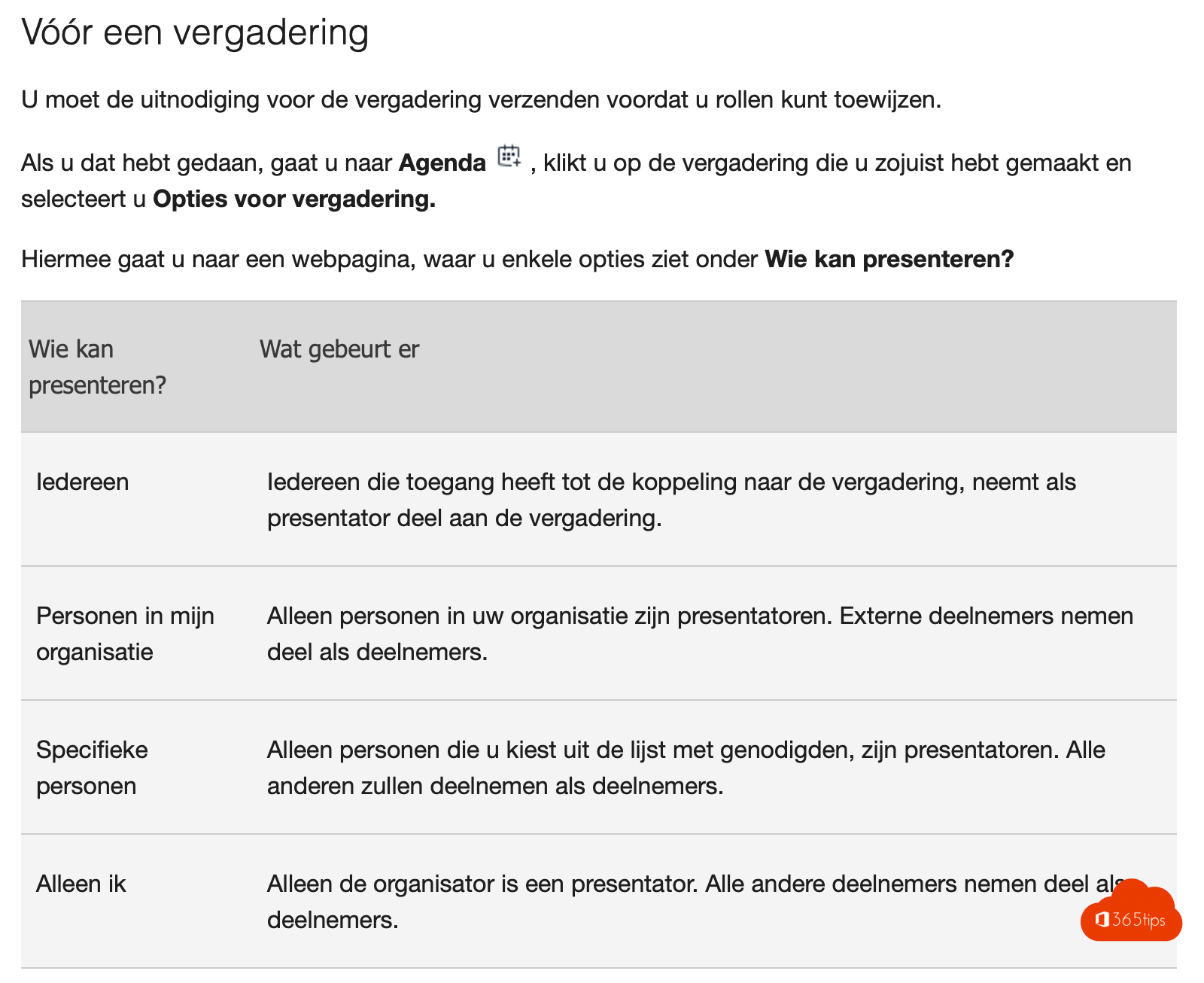
A speaker from outside your organization needs to show their slides in your Teams meeting. By default that doesn't always work: external participants and guests often join as attendees and can't present. This article shows how to make someone from outside your organization a presenter.
Beforehand in meeting options
- Open the meeting in your Teams calendar > Options > Meeting options.
- Under Who can present?, choose Specific people and search for the external person. They must be on the invite.
- Or choose Everyone if anyone may present.
- Select Save.
During the meeting
- Open People (the participant list).
- Hover over the external person > More options (...) > Make a presenter.
The person can now share their screen or a PowerPoint. To undo it, choose Make an attendee.


Not working?
- Anonymous participants (without an account) can only present if your admin allows it in the meeting policy.
- Ask the external speaker to join with their work account rather than as an anonymous guest.
- Do a short test beforehand, especially if they use a Mac or the browser.
Also see meeting roles in Teams and join a Teams meeting as an external guest.
Read also
Meeting roles in Microsoft Teams: organizer, presenter and attendee
Join a Microsoft Teams meeting as an external participant
Share your screen with computer sound in Microsoft Teams
Nederlandstalige versie: Iemand van buiten je organisatie presentator maken in Teams
More in English
▸Use presenter mode (Standout, Side-by-side, Reporter) in Microsoft TeamsStay visible with your slides using the Standout, Side-by-side and Reporter presenter modes in Teams. Plus…
▸The co-organizer role in a Microsoft Teams meetingAdd up to 10 co-organizers to a Teams meeting. What they can and can't do, and how they differ from…
▸Who can bypass the lobby in Microsoft Teams: every option explainedLet only invited people join your Teams meeting directly. Every Who can bypass the lobby option, per meeting…
▸Set up external access in Microsoft TeamsChat and meet with other organizations through external access. Learn the difference with guest access and…