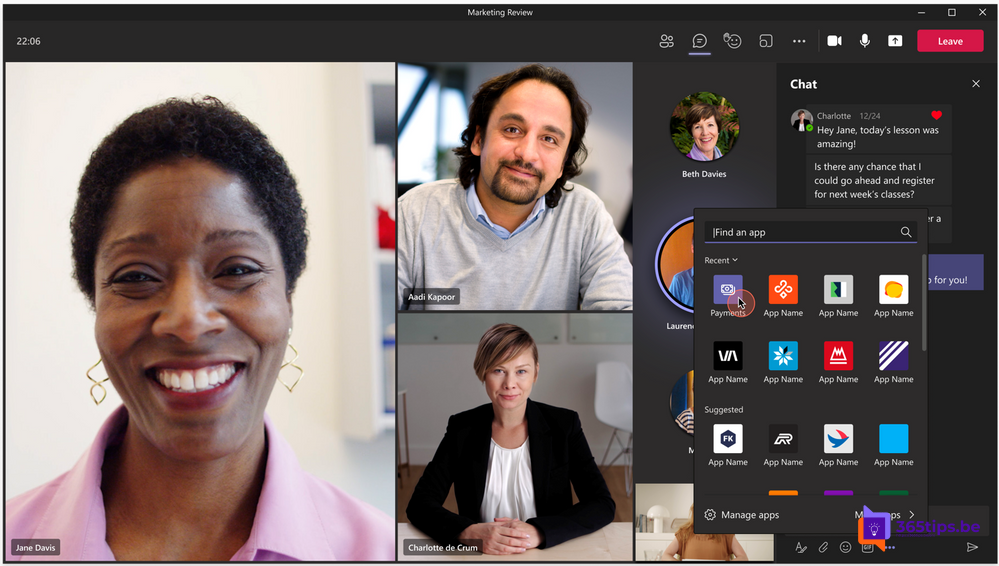
In 2021 Microsoft launched the Teams Payments app. Small businesses could use it to request payments during a Teams meeting or appointment, for example for a consultation or lesson. As far as we know the app has since been retired and is no longer available in the Teams store; check the Teams store or Message center if in doubt. So how do you request a payment today when you work with Teams?
What did the app do?
- Send a payment request in a Teams meeting.
- Receive payments through a third-party payment provider.
- Mainly aimed at small businesses arranging appointments through Teams or Bookings.
Alternatives
| Option | How |
|---|---|
| Payment link | Create a payment link or QR code with your payment provider or bank and share it in the meeting chat. |
| Invoicing software | Send an invoice with a payment link from your accounting or invoicing package. |
| Apps in Teams | Search the Teams store for an app from your payment or invoicing provider. Check that your admin allows it. |
| Microsoft Bookings | Let customers book appointments online and handle payment separately through your provider. |
What to watch out for
- Never share card details or passwords in a chat.
- Only use payment providers you know and trust.
- Have your IT admin review third-party apps before you add them.
Also see set up Microsoft Bookings and why Microsoft 365 Business Premium.
Read also
Set up Microsoft Bookings so others can schedule appointments themselves
Five reasons to start with Microsoft 365 Business Premium
Schedule a Microsoft Teams meeting in your calendar
Nederlandstalige versie: De Teams Payments-app: wat ervan geworden is en alternatieven
More in English
▸The most useful Microsoft Teams features in one listTips for chat, meetings and productive work in Teams, each with a link to a full…
▸Microsoft 365 licenses compared: which one do you need?Business Basic, Standard and Premium, E3, E5 and Frontline: what's included and which Microsoft 365 license…
▸Schedule and host a webinar with Microsoft TeamsRun a webinar in Microsoft Teams with a registration page, speakers, Q&A and reports. Plus how it compares to…
▸Five reasons to start with Microsoft Teams, and how to beginChat, meetings, files and apps in one place: the five main reasons to use Teams and the first steps to get…