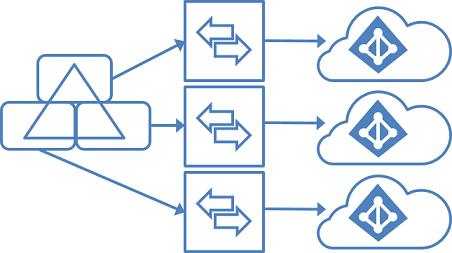
Some IT service providers or groups of companies have several organizations in a single on-premises Active Directory. Does each organization want its own Microsoft 365 tenant? That's possible. You sync users from one AD to multiple tenants, and then work step by step toward a fully cloud-based environment. Note that Azure AD Connect is now called Microsoft Entra Connect, and there's also Entra Cloud Sync, a lighter agent.
Why separate tenants?
- Each organization decides on its own settings, licenses and security.
- Regulations such as GDPR and standards such as ISO 27001 require a clear separation of data.
- An organization that leaves or is sold can move on without affecting the others.
- Not everyone moves to the cloud at the same pace.
The key rule: each object only once
A user, group or contact from your AD may be synced to only one tenant. That's why you set up a separate sync server or agent per tenant, and filter by organizational unit (OU), domain or attribute. That way organization A only ends up in tenant A, and organization B only in tenant B.
Check Microsoft's page on supported Entra Connect topologies for the exact conditions, for example around UPN suffixes, Exchange hybrid and password writeback.
Migration scenario step by step
- Clean up your AD. Put each organization in its own OU and give each organization its own UPN suffix (for example @companya.com and @companyb.com).
- Create a tenant per organization and add its own domain.
- Install Entra Connect or Cloud Sync per tenant and filter on the right OUs. Make sure there's no overlap.
- Migrate email to Exchange Online.
- Move home drives and personal folders to OneDrive, and shared folders to SharePoint or Teams.
- Move applications to the cloud: SaaS, Azure or a third party. Connect them to Entra ID for single sign-on where possible.
- Convert printers to a cloud solution such as Universal Print, or distribute them via Intune.
- Manage devices with Intune and join them to Entra ID instead of the domain. Roll out new PCs with Autopilot.
- Convert Group Policy to profiles in the Intune Settings catalog.
- Stop syncing once nothing depends on the on-premises AD anymore, and make the accounts cloud-only.
Collaborating between the tenants
Do the organizations still need to work together? Use B2B collaboration with guest access, shared channels in Teams via B2B direct connect, or cross-tenant synchronization to show users as members in another tenant. There are also multitenant organization features. Check which license that requires.
Also see set up Microsoft Entra Connect and disable directory sync and go cloud-only.
Nederlandstalige versie: Microsoft 365 in meerdere tenants vanuit één Active Directory