Does your on-premises Active Directory use an internal domain name such as contoso.local? Then your users can't use it to sign in to Microsoft 365. The solution: add your public domain as an alternative UPN suffix in Active Directory. That way the user name (UserPrincipalName) can match the email address. Change your UPNs before you start syncing with Microsoft Entra Connect Sync (formerly Azure AD Connect); it saves you a lot of work later.
Why add a UPN suffix?
- Users sign in to Microsoft 365 with their UPN. It must end in a domain verified in your tenant.
- You can't verify an internal name such as .local in Microsoft 365.
- When the UPN matches the email address, users only have to remember one name.
Add the domain to Microsoft 365 first. Read add a new domain to Microsoft 365.
Add the domain in Active Directory
- Sign in on a domain controller or a management PC with RSAT.
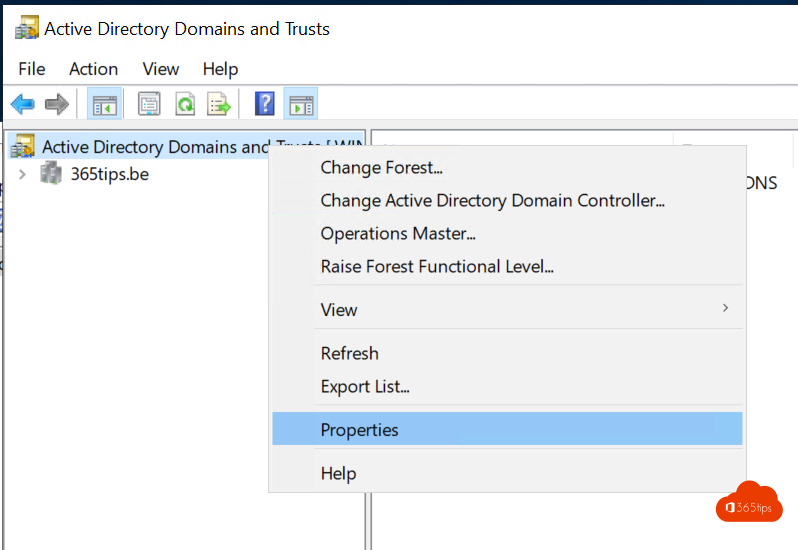
- Open Active Directory Domains and Trusts.

- Right-click the top item in the tree and choose Properties.
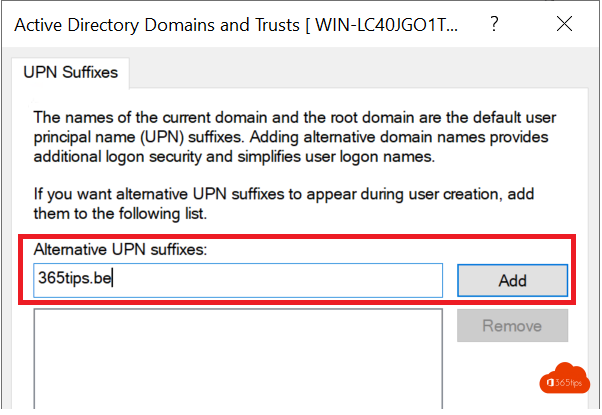
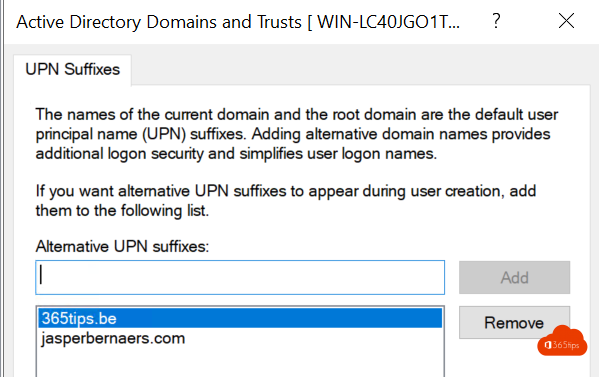
- Under Alternative UPN suffixes, type your domain, for example contoso.com, and select Add.
- Select OK.
Prefer PowerShell? Use the Active Directory module:
Get-ADForest | Set-ADForest -UPNSuffixes @{Add="contoso.com"}Use the suffix
For a new user you now choose the domain in the list next to the logon name. For existing users, change the UPN in the properties, on the Account tab.

Changing many users at once? Use a script:
Get-ADUser -Filter "UserPrincipalName -like '*@contoso.local'" -SearchBase "OU=Users,DC=contoso,DC=local" |
  ForEach-Object {
    $new = $_.UserPrincipalName -replace '@contoso.local$','@contoso.com'
    Set-ADUser $_ -UserPrincipalName $new
  }
Test such a script on a few test accounts first.
Tips for your migration
- Change the UPNs before you install Microsoft Entra Connect Sync.
- Make sure the UPN matches the primary email address.
- Already syncing? A UPN change is usually synced along. Also see change the UserPrincipalName with PowerShell.
Also see set up Microsoft Entra Connect and enable Seamless SSO.
Read also
Add your own domain to Microsoft 365
Install and configure Microsoft Entra Connect (Azure AD Connect)
Change a UserPrincipalName (UPN) in Microsoft 365 and Entra ID
Nederlandstalige versie: Een domein als UPN-achtervoegsel toevoegen in Active Directory