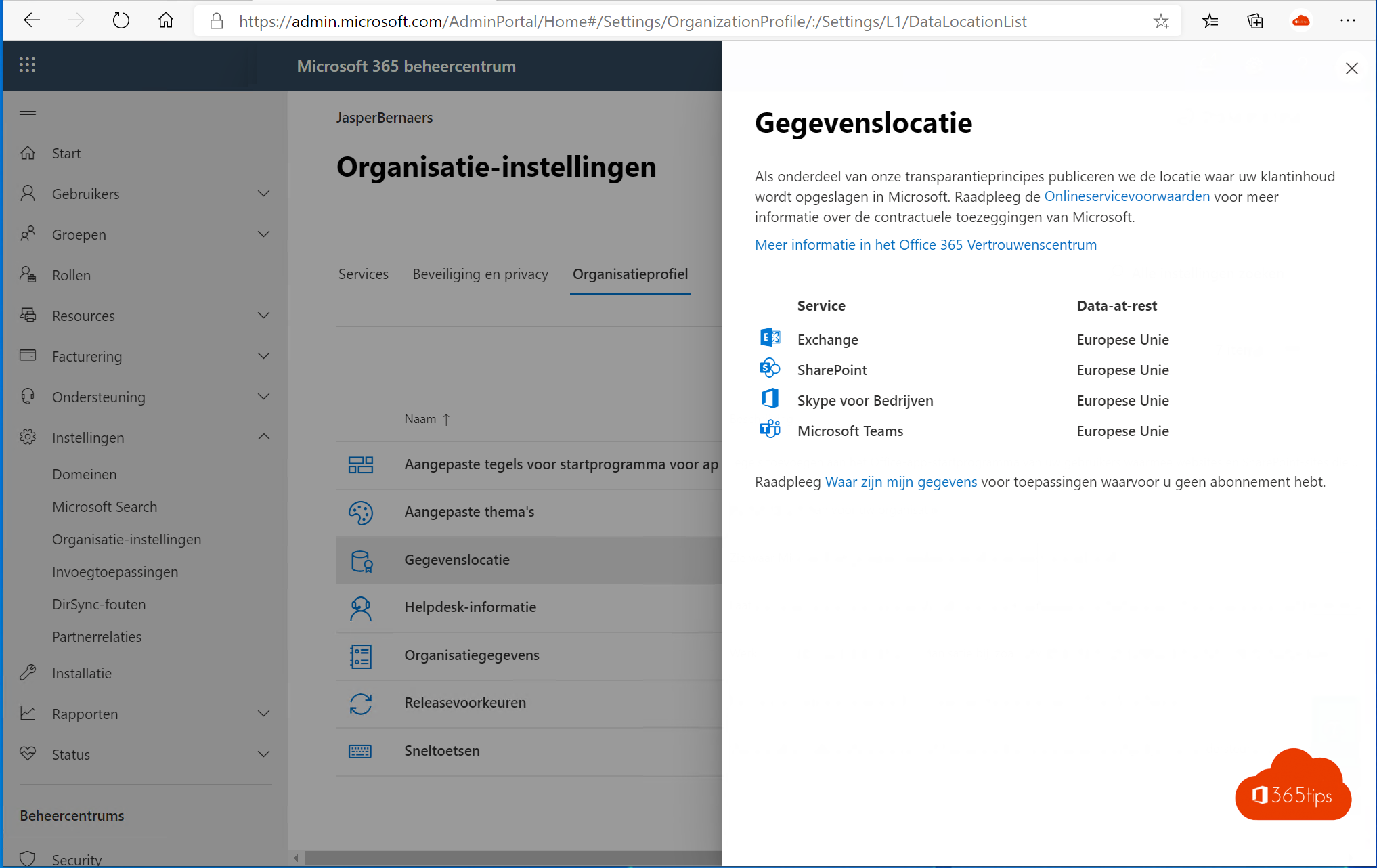
Where are your organization's emails, files and Teams chats physically stored? That question comes up in every GDPR assessment, every tender and every security questionnaire from a customer or auditor. In Microsoft 365 you can look up your tenant's data location yourself in the admin center. This article shows where to find it, what the EU Data Boundary means, and which options exist if you need data kept in a specific country.
Find the data location
- Go to the Microsoft 365 admin center.
- Choose Settings > Org settings.
- Open the Organization profile tab > Data location.
You see per service (Exchange Online, SharePoint and OneDrive, Teams and so on) in which region or country data at rest is stored, for example European Union or Netherlands. You need at least the Global Reader role.

How is the location decided?
- When the tenant is created, the country you entered sets the default region. A Belgian tenant lands in the European datacenters.
- Microsoft talks about regions (geographies), not a single server: data is replicated across several datacenters within the region for redundancy.
- You can't change the tenant's country afterwards. Moving to another region is only possible through a migration or a Microsoft program for new local datacenters.
The EU Data Boundary
For customers in the European Union and EFTA, Microsoft has rolled out the EU Data Boundary. It keeps not only customer data, but also personal data in logs and most technical support data, stored and processed within the EU. There are limited exceptions, for example for security services that analyze threats globally. Microsoft publishes the details in its Trust Center and product terms.
Keep data in a specific country
| Option | What | For whom |
|---|---|---|
| Default | Data in the tenant's region (for example the EU) | Most organizations |
| Advanced Data Residency | Add-on that contractually commits storage to a country with local datacenters | Government, healthcare, finance |
| Multi-Geo | Pick a different region per user or site within one tenant | Multinationals with per-country legal requirements |
Which countries Advanced Data Residency supports depends on where Microsoft has local datacenters. Check the current list with Microsoft or your partner.
What goes into a GDPR file?
- A screenshot or export of the data location per service.
- A reference to Microsoft's Data Protection Addendum (DPA), which is part of your contract.
- Which services you use that may process data outside the default region, such as some AI features or third-party apps in Teams.
- Your own measures: MFA, security defaults, retention policies and access control.
Read also
All Microsoft 365 admin portals in one list: the right URLs in 2026
Which Microsoft 365 licence do I have? How to check
Security defaults in Microsoft Entra ID: what they do and how to enable them
Nederlandstalige versie: Waar staan de gegevens van je Microsoft 365-tenant?