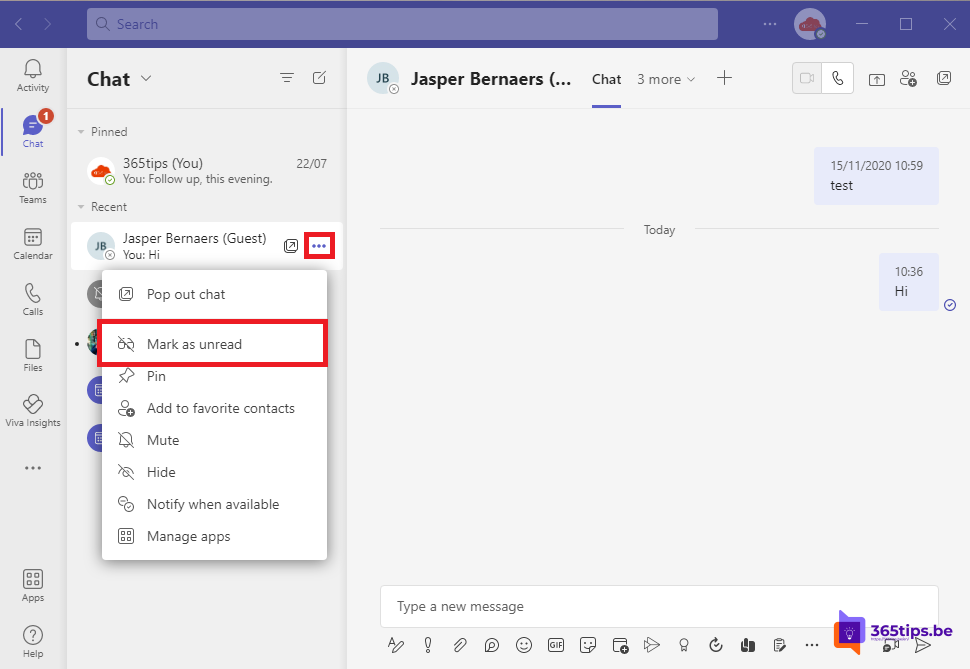
You read a Teams message on the go but want to reply later. Once opened, the bold is gone and you risk forgetting it. With Mark as unread you put the message or chat back in bold so it keeps standing out. This article shows how, and how to see all your unread messages quickly.
Mark a chat or message as unread
- A whole chat: hover over the chat in the chat list > More options (...) > Mark as unread.
- A channel message: hover over the message > More options > Mark as unread.
- On your phone: press and hold the chat and tap Mark as unread.
See all unread messages
- Select Unread (or the filter icon) at the top of the chat list to see only unread chats and channels.
- Open Activity and filter on Unread for mentions and reactions.
- In the combined chats and channels view you can create your own section, such as Follow up.
Other ways to follow up
- Save a message: hover over the message > More options > Save this message.
- Create a task: turn the message into a Planner task with a date. Read create a task from a chat message.
- Pin: pin an important chat so it stays at the top.
- Reminder: schedule a message to yourself. Read chat with yourself.
Tip
The sender doesn't see that you marked the message unread again. If you have read receipts on, they do see that you already read it.
Read also
Create a task from a chat message in Microsoft Teams
How to chat with yourself in Microsoft Teams
Turn read receipts on or off in Microsoft Teams
Nederlandstalige versie: Een bericht markeren als ongelezen in Microsoft Teams
More in English
▸Create a task from a chat message in Microsoft TeamsTurn a Teams message into a Planner task with a link back to the original message. Plus alternatives like…
▸Reply to a specific message in Microsoft TeamsReply to a specific message in a Teams chat or channel with the original as a quote, on your computer or…
▸Delete a message or an entire chat in Microsoft TeamsDelete or edit your own messages and remove an entire chat from your list in Teams. Plus hide, mute, leave…
▸How to schedule a chat message in Microsoft TeamsSchedule a chat message in Microsoft Teams on desktop and phone, change or cancel it, and schedule posts in…