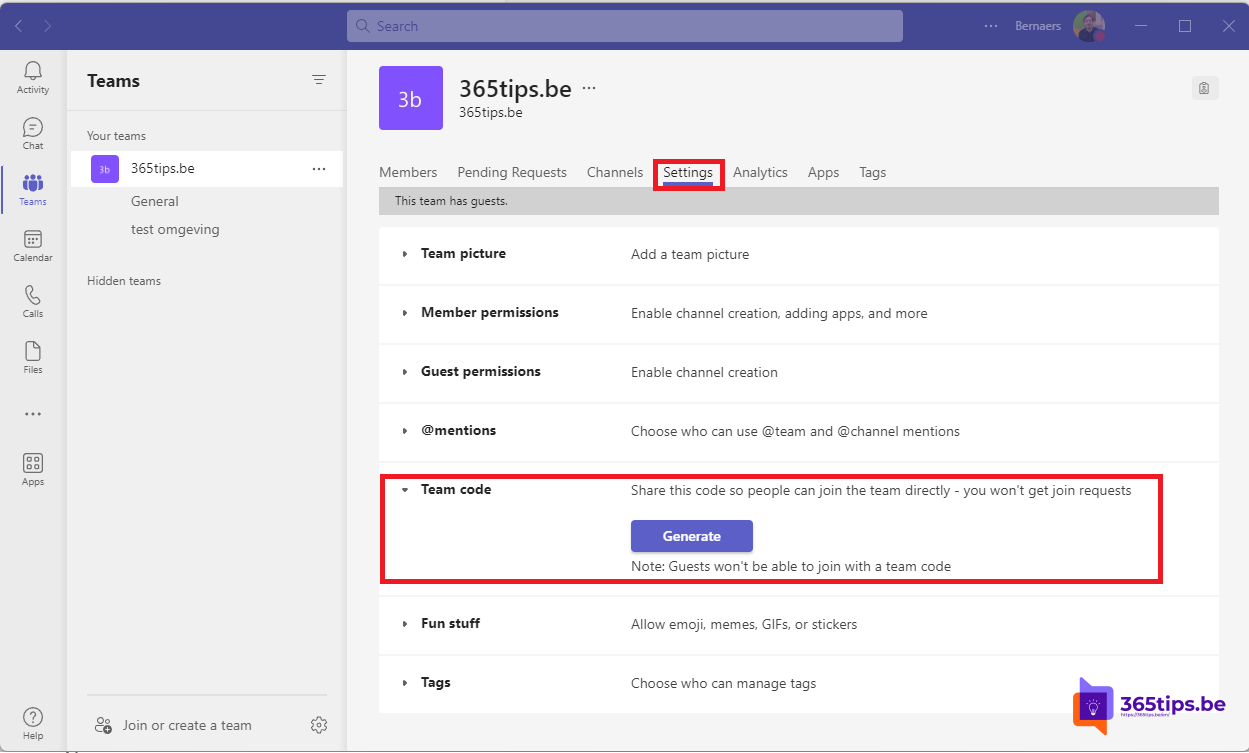
A class, a working group or an event: sometimes you want people to join a team themselves, without you looking up every name. With a team code you share a short code, and anyone in your organisation who enters it becomes a member. This article shows how to create a code and how joining works.
Create a team code
- Hover over the team > More options (...) > Manage team (or Settings).
- Open the Settings tab and expand Team code.
- Select Generate. Teams creates a seven-character code.
- Select Copy and share the code by email, chat or on a slide. Full screen shows the code large during a class or presentation.

Join with a code
- In Teams, select Teams > + (Create or join) > Join a team with a code.
- Type the code and select Join.

Good to know
- Only owners can create a team code.
- The code only works for people in your own organisation. Guests can't use it. Read add guests.
- The code also works for private teams: anyone with the code gets in without approval. Only share it with the right people.
- Code leaked or no longer needed? Under Team code, select Reset for a new code, or Remove.
Alternatives
- Share a link to the team: More options > Get link to team. For a private team an owner must approve the request.
- Adding lots of people at once: read add multiple members at once.
Read also
Add multiple users to a team at once in Microsoft Teams
Create and organise a team in Microsoft Teams
How to add external guests in Microsoft Teams
Nederlandstalige versie: Een teamcode maken zodat collega's zelf deelnemen aan je team
More in English
▸Add multiple users to a team at once in Microsoft TeamsAdd many members to a team at once: through a group, with PowerShell and a CSV file, or automatically with…
▸Create a standard, private or shared channel in Microsoft TeamsCreate a channel in Microsoft Teams and choose between standard, private and shared. Posts and Threads…
▸Clean up Microsoft Teams automatically with expiration policies and archivingClean up old teams automatically with an expiration policy, let owners confirm with access reviews, fix…
▸Disable Meet now in Teams so students can't start meetingsStop students starting their own Teams meetings: turn off Meet now in a meeting policy and assign it to the…